
Most people find out their cameras have a problem at the worst possible moment — the morning after something happens, when they scrub back through the footage and find a white glare, a spider silhouette, or a gap where the recording should be.
That’s the real argument for security camera maintenance in NZ. It isn’t about keeping gear looking tidy. It’s about making sure the system actually delivers usable evidence on the one night it matters. And in New Zealand, the things working against your cameras are unusually aggressive: salt-laden air that reaches kilometres inland, some of the harshest UV on the planet, damp winters, and a spider population that treats infrared LEDs like a free buffet.
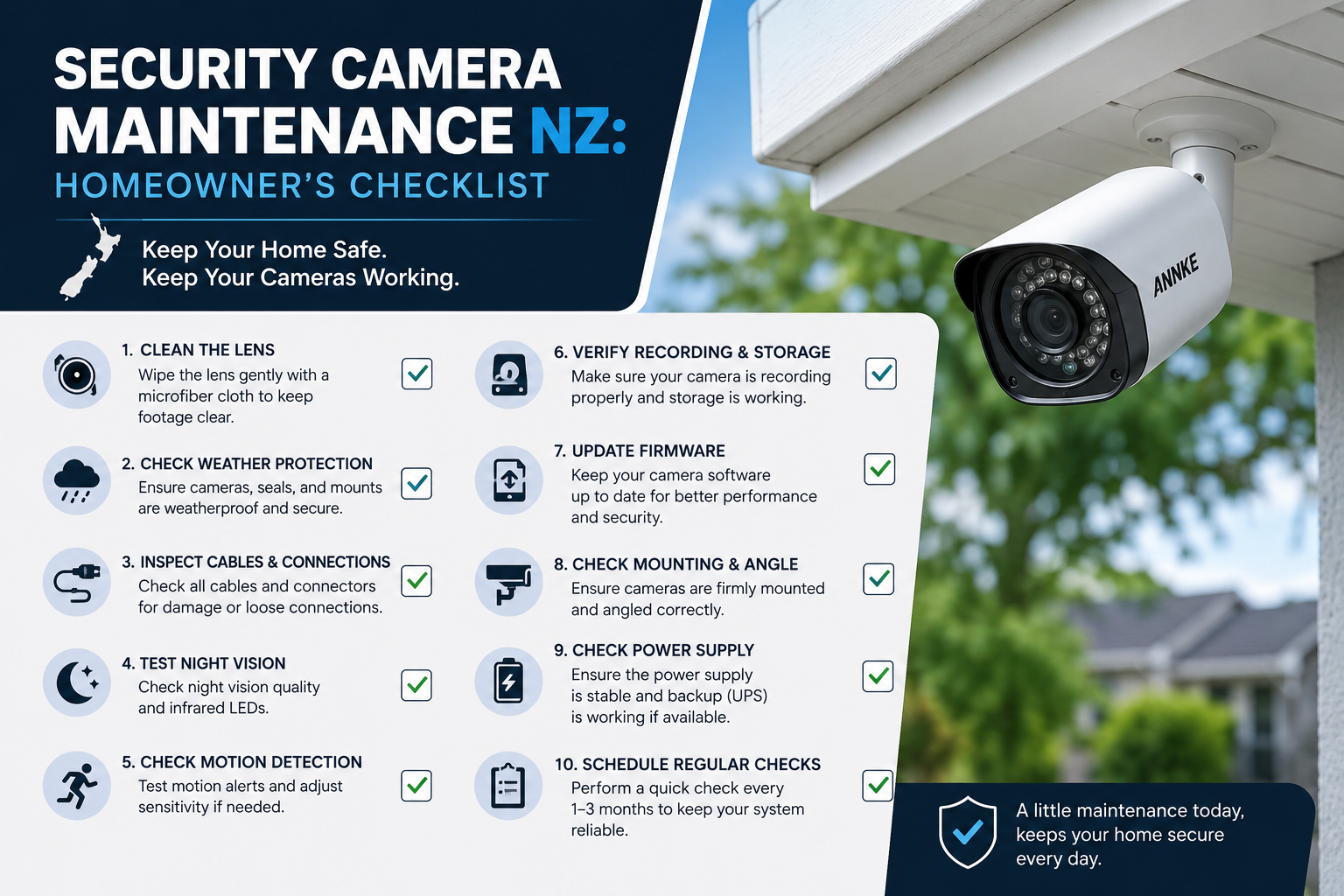
This checklist is built specifically for New Zealand homes. You’ll get a realistic maintenance schedule, the correct way to clean an outdoor camera without destroying it, a symptom-to-cause troubleshooting table, and clear guidance on when a camera is worth servicing versus replacing.
Why Security Camera Maintenance in NZ Is Different
Generic CCTV maintenance advice is usually written for the northern hemisphere. It underestimates three conditions that Kiwi homeowners live with every day.
Salt spray travels much further than people assume
New Zealand is a long, narrow country, and almost none of it is truly sheltered from marine air. Under NZS 3604:2011, Zone D — the high-corrosion zone — covers everything within 500 m of the coast, within 100 m of tidal estuaries and sheltered inlets, and all offshore islands. In that zone, structural fixings are required to be type 304 stainless steel, because ordinary galvanised steel simply doesn’t last.
Your camera brackets, screw fixings and cable glands are subject to exactly the same chemistry. BRANZ notes that the combination of saltwater spray, UV and geothermal activity in close proximity makes New Zealand “a uniquely challenging place to build in.” A camera that would run untouched for eight years in Hamilton may need annual attention in Raglan, Napier or Island Bay.
Prevailing westerlies also push salt aerosol well inland, so “I can’t see the sea” is not the same as “I’m not in a salt zone.” If you’re unsure, BRANZ Maps lets you look up your exposure zone.
UV in New Zealand is roughly 40% stronger
According to NIWA, the peak UV Index in New Zealand is approximately 40% greater than at comparable latitudes in the Northern Hemisphere, driven by differences in ozone, sun–earth separation and pollution.
That matters because most of what’s exposed on an outdoor camera is polymer: the dome bubble, the sunshade, cable sheathing, and the rubber gaskets that keep water out. UV degrades all of them. Yellowed domes scatter light and soften image detail. Perished gaskets are the single most common route for moisture to get inside an otherwise “waterproof” housing.
Damp, mould and the spider cycle
Much of the North Island sits in a humid subtropical band, and condensation inside camera housings is a common New Zealand fault — often mistaken for a failed sensor. Meanwhile, infrared illuminators attract insects at night, and where there are insects there are webs. A single strand of silk 20 mm from an IR LED will light up like a flare and trigger motion alerts all night, every night, until you clean it off.
Spider activity in New Zealand peaks over late summer and autumn, so February through May is when most homeowners start complaining about false alerts.
The Security Camera Maintenance Checklist at a Glance
| Frequency | What you’re doing | Time needed |
|---|---|---|
| Monthly | Live-view check on every camera, confirm recording, clear webs | 10 minutes |
| Quarterly | Clean lenses and domes, check mounts and seals, test night vision | 30–45 minutes |
| Twice yearly | Deep service: freshwater rinse (coastal), cable and connector inspection, recorder health check | 1–2 hours |
| Annually | Firmware, passwords, storage/retention review, coverage reassessment | 1 hour |
| As needed | After storms, painting, roofing work, or landscaping changes | Varies |
A useful trick: anchor the twice-yearly service to the daylight saving changeover (late September and early April). You’re already changing clocks and testing smoke alarms — add the cameras to that ritual and you’ll never lose track of when you last serviced them.
Monthly: The 10-Minute Check
This is the habit that catches 80% of problems while they’re still trivial.
- Open your app or NVR and view every camera live. Not the two you always look at — every one. Cameras fail silently.
- Confirm each camera is actually recording. Scrub back to a random point in the last week on each channel. A camera that streams live but has stopped writing to disk is a classic and expensive failure to discover late.
- Check overnight footage once. Night is when image quality problems show up first.
- Sweep webs off housings and sunshades with a soft brush or long-handled duster. No chemicals needed.
- Glance at the recorder itself — is the drive light active, are there error notifications, is the unit hot or dusty?
If your cameras have been generating a lot of false alerts, note when they occur. Clusters after dark almost always point to insects or webs; clusters in wind point to vegetation in frame.
Quarterly: Hands-On Clean and Inspect
How to clean a security camera lens without wrecking it
Camera domes are usually polycarbonate, not glass — and polycarbonate scratches easily and reacts badly to solvents. This is where most DIY maintenance goes wrong.
Do this:
- Power down or at least be aware the camera is live before handling it.
- Rinse loose grit off first with clean water. Dry-wiping a dusty dome is how you create permanent swirl marks.
- Use a clean microfibre cloth, lightly damp, and wipe in gentle straight passes rather than circles.
- For stubborn residue, a drop of mild dish soap in water is sufficient. Dry with a second clean microfibre cloth.
- Finish by checking the dome from the camera’s own point of view: look at the live image, not just the glass.
Don’t do this:
- No glass cleaner, ammonia, methylated spirits or solvent-based products on domes — they cause hazing and micro-cracking in polycarbonate.
- No paper towels, tea towels or jumper sleeves. They’re abrasive.
- No high-pressure water. An IP66 or IP67 rating does not mean water-blaster proof, and directing a jet at a gasket is a good way to force water past it.
Dome cameras: the infrared halo problem
If your night footage is washed out but daytime looks fine, the cause is usually not a failing camera. It’s IR light reflecting off a dirty or degraded dome back into the lens.
Check three things in order: the dome surface, the black foam gasket that sits between the lens and the dome (it should be seated flush all the way around), and whether the dome has yellowed or crazed from UV. A perished foam gasket is a cheap part and an easy fix; a UV-hazed dome usually means replacing the dome cover or the camera.
Mounts, seals and cabling
- Wobble each camera gently. Movement means loosening fixings or a compromised wall plug.
- Look for rust streaks on the wall below the mount — an early warning of fixing corrosion, especially in coastal zones.
- Check that cable entries are still sealed and that the drip loop (a downward curve in the cable before it enters the wall) is intact. Water follows cables.
- Inspect exposed cable for UV cracking, rodent damage and chafing at bend points.
Test what you actually rely on
Walk your driveway, gate and side path at night while someone watches the feed. Confirm motion zones still trigger, IR illuminators fire, and the person in frame is identifiable — not just detectable. Those are two very different standards, and only one is useful to Police.
Twice a Year: The Deep Service
Coastal homes: the freshwater rinse
If you’re inside Zone D — within 500 m of the coast or 100 m of a tidal estuary — salt deposits build up on housings, brackets and fixings continuously. Left in place, salt is hygroscopic: it pulls moisture out of the air and holds a corrosive film against metal even on dry days.
Twice a year, gently rinse camera housings, brackets and fixings with fresh water from a low-pressure hose or a damp cloth, then dry them. It’s the same logic as hosing down a boat trailer. Where fixings are already showing surface rust, replace them with 316 or 304 stainless rather than trying to clean them up.
One point worth understanding: IP ratings under IEC 60529 are tested with fresh water and describe ingress protection, not corrosion resistance or UV durability. An IP67 camera in a sea spray zone is still a camera in a sea spray zone.
Recorder, storage and power
- Clear dust from the NVR/DVR vents and confirm airflow. Heat is the leading cause of premature drive failure.
- Check drive health through your recorder’s system or HDD menu. Look for SMART warnings, bad sectors or repeated re-initialisation.
- Check your actual retention period. If you set the system up for 30 days and it’s now overwriting at 11, either a camera’s bitrate changed or the drive is failing.
- Confirm the recorder is on surge protection. New Zealand’s 230 V supply plus summer thunderstorms is a genuine risk to NVRs and PoE switches, and surge damage is rarely covered as a warranty fault.
- Test the UPS or battery backup, if fitted, by pulling mains power for a few minutes and confirming the system stays up.
Surveillance recording is a continuous-write workload, and standard desktop hard drives aren’t designed for it. If you’re replacing a drive, use a surveillance-rated drive rather than a generic one — ANNKE’s storage range is spec’d for this duty cycle.
Annually: Firmware, Passwords and Coverage
Firmware and app updates. Update cameras, the recorder and the mobile app. Security patches for IP cameras are not optional — an unpatched, internet-exposed camera is a genuine network risk. Update the recorder first, then the cameras, and don’t power anything down mid-flash.
Credentials. Change the admin password if it hasn’t been changed since installation, and make sure it isn’t the default. Remove app access for anyone who no longer needs it — old flatmates, a previous property manager, a tradesperson you gave temporary access to.
Coverage review. Properties change. A hedge grows, a carport goes up, a new gate changes the approach path. Walk the property and ask where an intruder would actually enter today, then check whether a camera covers it at a useful resolution.
Privacy check. Home CCTV is generally outside the Privacy Act unless the conduct is highly offensive, but the Office of the Privacy Commissioner’s guidance on CCTV at home recommends avoiding pointing cameras at a neighbour’s doors and windows, using signage, not keeping footage longer than necessary, and not posting neighbour footage on social media. Cameras drift over time — an annual check that yours still point where you intended is worth the two minutes.
Symptom → Likely Cause: Quick Reference
| What you’re seeing | Most likely cause | First thing to try |
|---|---|---|
| Washed-out night footage, clear by day | IR reflecting off dirty/hazed dome or a displaced lens gasket | Clean the dome; reseat the foam gasket |
| Constant overnight motion alerts | Spider webs or insects near IR LEDs | Clear webs; adjust motion sensitivity/zones |
| Fog or droplets inside the housing | Failed gasket or cable-gland seal | Inspect seals; check drip loop; replace gasket |
| Camera drops offline intermittently | PoE cable damage, water in an RJ45 joint, or a failing switch port | Reseat/replace the cable run; try another port |
| Footage exists but retention is shorter than expected | Failing drive or increased bitrate | Check drive health and camera bitrate settings |
| Colours look off, image soft in daylight | UV-degraded dome or lens film | Clean; replace dome cover if hazed |
| Camera works but faces the wrong way | Mount loosened by wind or a knock | Re-aim and tighten; check fixing corrosion |
Common Maintenance Mistakes NZ Homeowners Make
- Water-blasting the house — and the cameras. The most common way an IP66 camera suddenly stops being waterproof.
- Trusting the live view. Live streaming and recording are separate functions. Test playback, not just preview.
- Skipping the recorder. People clean lenses religiously and never open the cabinet the NVR lives in.
- Using glass cleaner on domes. Instant, permanent hazing on polycarbonate.
- Painting or re-roofing without covering cameras. Overspray on a dome is effectively unrecoverable.
- Ignoring the first rust streak. In coastal zones a corroding fixing goes from cosmetic to structural surprisingly fast.
- Never checking retention. Discovering your 30-day archive is really 9 days on the day you need day 14.
Repair, or Replace?
Maintenance keeps good hardware working. It can’t fix hardware that’s reached the end of its useful life.
Worth servicing: loose mounts, dirty or gasket-faulty domes, corroded fixings, dead hard drives, damaged cable runs, out-of-date firmware. All of these are cheap relative to the system’s value.
Worth replacing: a camera with persistent internal condensation after the seals have been redone, a UV-crazed housing, a unit no longer receiving firmware updates, or any camera whose resolution can’t produce an identifiable face at the distance you actually need. A 720p camera that’s been maintained beautifully still won’t give Police a usable image from 12 metres.
If a coastal camera is corroding faster than the rest of your system, the honest answer is often that it was never specified for that exposure zone. Replacing it with an appropriately rated unit is cheaper than servicing it twice a year forever. You can compare current outdoor options across the ANNKE NZ range, including PoE security cameras, which avoid battery maintenance entirely and are generally the more reliable choice for permanent outdoor installation in New Zealand conditions.
When to Call a Professional
Handle the monthly and quarterly work yourself — it’s straightforward and it’s the work that matters most. Bring in an installer when:
- Cameras are mounted at height or on a steep roof. No footage is worth a fall.
- You need cable runs re-terminated, re-routed or replaced.
- Multiple cameras fail at once, which usually points to the switch, the power supply or a surge event.
- You’re expanding the system and want channel capacity, storage and network load reassessed properly.
- You’ve had water ingress inside the recorder or PoE switch.
For homeowners who want a formal record — useful for insurance — a structured template like this CCTV maintenance checklist from SafetyCulture is a reasonable starting point to adapt, though it’s written for commercial sites rather than homes.
Frequently Asked Questions
How often should security cameras be maintained in New Zealand? Do a 10-minute live-view and recording check monthly, a hands-on clean and inspection quarterly, and a deep service twice a year. Coastal properties within 500 m of the sea should rinse housings and fixings with fresh water at least twice yearly, and inspect fixings for corrosion more often.
How do I clean an outdoor security camera lens? Rinse loose grit off with clean water first, then wipe gently with a lightly damp microfibre cloth and dry with a second clean cloth. Use mild soapy water for stubborn residue. Never use glass cleaner, solvents, paper towels or high-pressure water on a camera dome.
Why do my security cameras keep sending false alerts at night? The usual cause is insects and spider webs near the infrared LEDs, which reflect IR light straight back into the lens. Clear webs regularly, keep bright lights away from camera positions where possible, and tighten motion zones and sensitivity. Activity typically peaks in late summer and autumn.
Does salt air damage security cameras in NZ? Yes. Under NZS 3604:2011, areas within 500 m of the coast and 100 m of tidal estuaries are classed as high-corrosion Zone D. Salt attacks mounting brackets, screws and cable glands well before it affects the camera electronics, so stainless fixings and regular freshwater rinsing make a large difference.
Is an IP66 camera safe to hose down? Not with pressure. IP ratings are tested with fresh water under defined conditions and describe ingress protection, not resistance to water blasters, salt corrosion or UV. Use low-pressure water or a damp cloth, and never aim a jet directly at seals or cable entries.
How long do security cameras last? With reasonable maintenance, quality outdoor cameras commonly run for many years, but lifespan depends heavily on exposure. A sheltered inland camera will outlast an identical unit in a sea spray zone. The practical retirement trigger is usually image quality or the end of firmware support, not outright failure.
Do I need to update my security camera firmware? Yes — at least annually, and sooner if the manufacturer issues a security patch. Internet-connected cameras running outdated firmware are a genuine network vulnerability, not just a feature-set issue. Update the recorder first, then the cameras.
The Bottom Line
Security camera maintenance in NZ isn’t complicated, but it does need to be deliberate — because our conditions are harsher than the generic advice assumes. Salt reaches further inland than most people expect, UV is roughly 40% stronger than at comparable northern latitudes, and damp plus infrared makes spider webs an ongoing operational problem rather than a novelty.
Ten minutes a month, a proper clean each quarter, and a deep service each daylight saving changeover will keep almost any system delivering footage you can actually use. The failures that catch people out are almost never dramatic — they’re a dirty dome, a perished gasket, a tired hard drive, or a camera that quietly stopped recording six weeks ago.
Run the checklist. And if the service reveals hardware that’s simply past its useful life for your exposure zone, browse ANNKE NZ’s outdoor camera and NVR range or get in touch with the team for advice on what’s appropriate for your site.
Sources referenced
- NIWA — UV and Ozone
- BRANZ — What’s corroding Aotearoa’s houses?
- Office of the Privacy Commissioner — CCTV at home
- SafetyCulture / Mitti — CCTV maintenance checklist


 No products in the cart.